Recover account access
If you cannot sign in, ask Boardweaver to email a recovery link to your account email, then choose a new password. This page also covers email confirmation links and guest sign-ins.
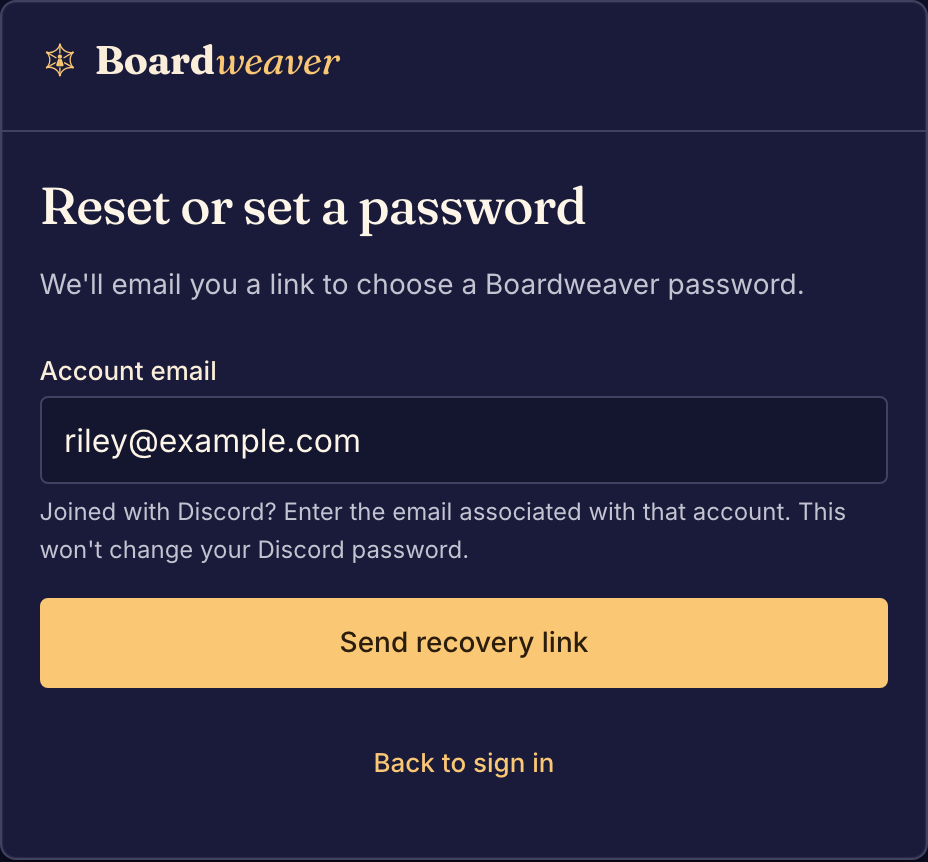
I forgot my password
You need a new Boardweaver password. Boardweaver emails a recovery link to your account email.
- Select Sign in, then Continue with email.
- Select Reset or set a password.
- Enter your Account email and select Send recovery link.
- Open the email and follow its link. The link works once and expires in 60 minutes.
- Enter a New Boardweaver password of at least 12 characters.
- Select Save password and sign in.
Boardweaver signs you in and returns you to the page where you asked for the link. Saving the new password signs you out on your other browsers and devices.
I joined with Discord and have no password
An account made with Discord has no Boardweaver password. To sign in with Discord, select Sign in, then Continue with Discord. To add a Boardweaver password, follow the steps above with the email address of your Discord account. This does not change your Discord password.
No recovery email arrives
Boardweaver sends the email only when the address belongs to an account, and the form does not say whether it does. Check your spam or junk folder. If you joined with Discord, try the email address you use for Discord. Then select Resend link, or Try another email.
The page says "Let's get a fresh link"
The recovery link expired, or you used it already. Select Send a new recovery link, then use the link in the newest email.
The sign-in form says "We couldn't sign you in."
The email address and the password do not match an account. Check both and try again. If you joined with Discord, select Continue with Discord instead.
Sign up says "You may already have an account"
An account already uses that email address. Sign in to that account, or recover its password. You do not need a second account.
A confirmation link says "This link is no longer valid."
Boardweaver emails you a link to confirm your email address. That link works once and expires after 24 hours. To get a new one, sign in and select Send a new link on that page. You can also select Send verification email on the Confirm your email banner.
A confirmation link confirms your address. It does not sign you in on the browser where you open it.
Sign-in asks "Restore your account?"
You deleted your account, and it is not deleted for good yet. Select Restore my account to keep it. See Delete or restore your account.
I played as a guest and lost my sign-in
A guest sign-in lasts 7 days on the device where you started it. It has no email address or password, so Boardweaver cannot recover it. A new guest name is a new player, without the old guest's matches. To keep a guest, add an email address or Discord before the 7 days end: see Play as a guest.
If you still cannot sign in, write to us from the Contact page.