Watch a replay
A replay plays back a finished match one move at a time. You can watch the replay of any match you sat at. A replay shows only what you could see from your seat.

Open a replay
- Open your profile, then the Recently played tab.
- Select a match. The replay opens. You can also select a match's scores, then Watch replay.
- Select Play to play the moves, and Pause to stop.
- To go to a move, drag the Move slider or use Previous move and Next move. First move and Last move go to the start and the end.
- To change the pace, choose a Speed. In some games, Skip waits plays every move at the same pace, without the long waits between moves.
Find and share a moment
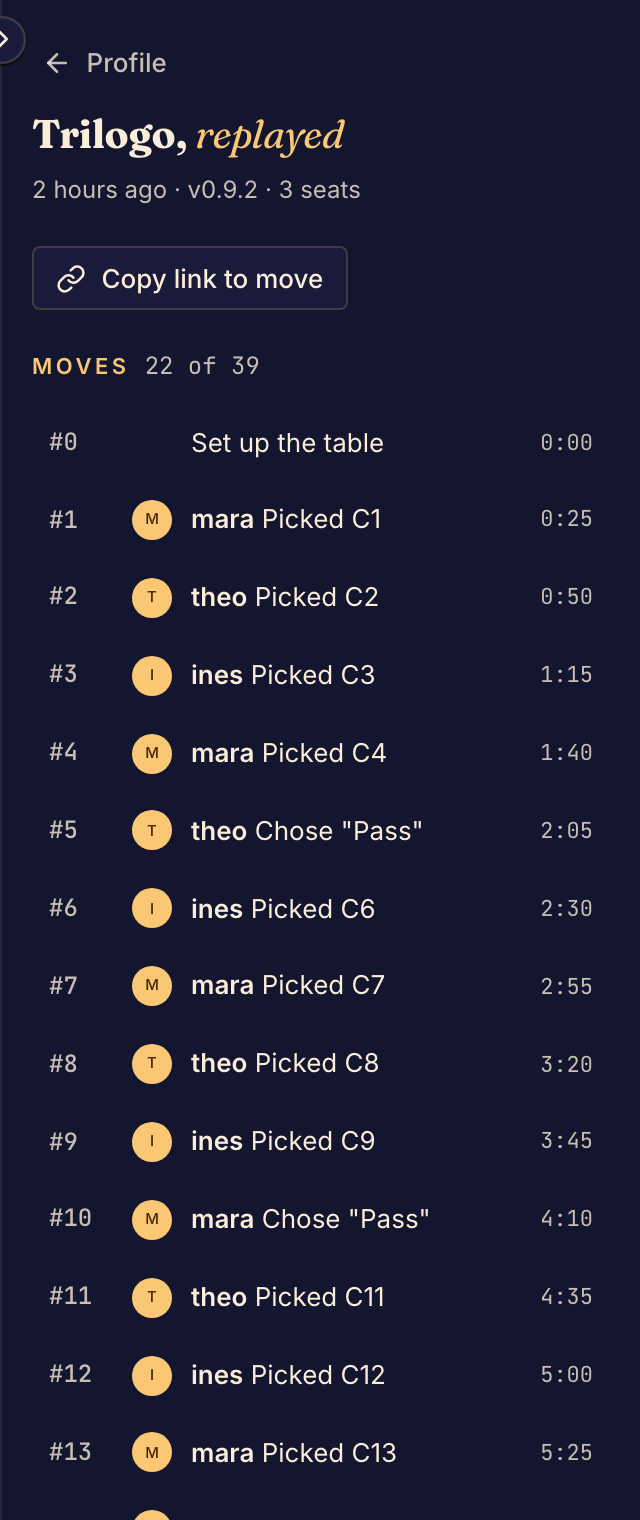
The side panel lists every move. Select a move to show the board at that move. In some games, Copy link to move copies a link that opens the replay at that move, so you can share it.
What a replay shows
A replay shows the match as your seat saw it. The hidden parts of other seats, such as the cards in another player's hand, stay hidden. The game's editors can watch the replay too.
If you see "This replay is off the table", you did not sit at that match. Only the people who sat at a match, and the game's editors, can watch it back.
To look back at moves in a match that is still going, see Review moves during a match.