Start a match
To play with friends, you host a match. You open a lobby, send its link to your group, and start the match when everyone is seated. The host is the person who opens the lobby, and only the host can start it.
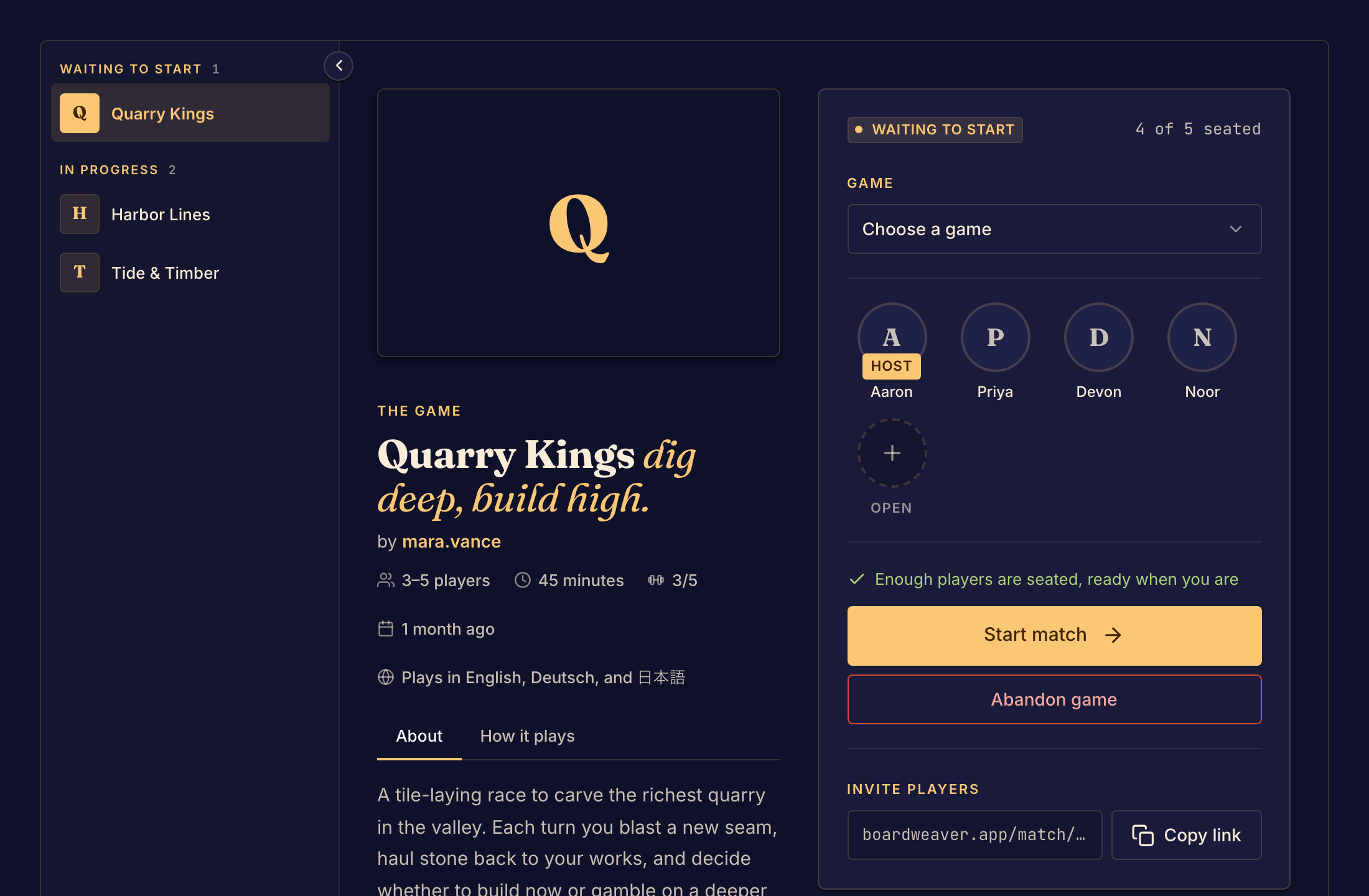
Host a match
- Open the game's page from Play. See Find a game.
- Select Play. If you are not signed in, sign in first. If the game lets guests host, you can instead type a name under Set up a table and select Start a match. Your lobby opens, with you in a seat and the Host badge.
- Under Invite players, select Copy link and send the link to your group.
- Wait for the others to take seats. The status line says how many more players the game needs.
- Select Start match. The board opens for everyone.
If Start match is not available, read the status line. See Seats and starting the game.
Choices in the lobby
- To play a different game, choose it from the Game menu.
- To add computer players, see Play with bots.
- To let people without a seat watch, turn on Open to spectators. See Watch a match.
- To close the lobby for everyone, select Abandon game.
A badge beside the game's name shows Public playtest or Beta when you host a version that is still being tested. A match keeps the game version it started with, even if the designer releases a new one.
Boardweaver removes a lobby that nobody has started after 12 hours. If the page says "Couldn't start a match", select Try again.