Find your way around the Studio
The Studio sidebar lists the pages of one game, in groups. Your role on the game (Admin, Editor or Playtester) decides which pages you see. Roles and permissions explains each role.
| Group | Page | Use it to | Who sees it |
|---|---|---|---|
| (top, no group) | Preview | Play your working copy before you commit it. | Everyone on the game |
| Build | Code | Edit the game's files. | Admins and editors |
| Build | Translations | Translate the game's text. | Admins and editors, Rust games only |
| Presentation | Art | Upload and manage gameplay art. | Everyone on the game |
| Presentation | Sounds | Upload music and sound effects. | Everyone on the game |
| Presentation | Theme | Set the game's fonts, colors and backgrounds. | Everyone on the game |
| Presentation | Rules | Read the rules pages. | Everyone on the game |
| Presentation | Marketing | Edit the game page that players see. | Admins and editors |
| Presentation | Release | See and change who can play which version. | Admins |
| Health | Stats | Read how your game is played. | Everyone on the game |
| Health | Errors | Find errors your game had in matches. | Admins and editors |
| Health | Matches | Review finished matches and feedback. | Admins and editors |
| Health | Feedback form | Choose what testers answer after a match. | Admins and editors |
| Access | Members | Invite people and change their roles. | Admins |
| Access | Guests | Let people play without an account. | Admins |
| Access | Delete game | Delete the game. | Admins |
Your working copy is the set of saved files you edit and preview. Players do not see it until you commit it.
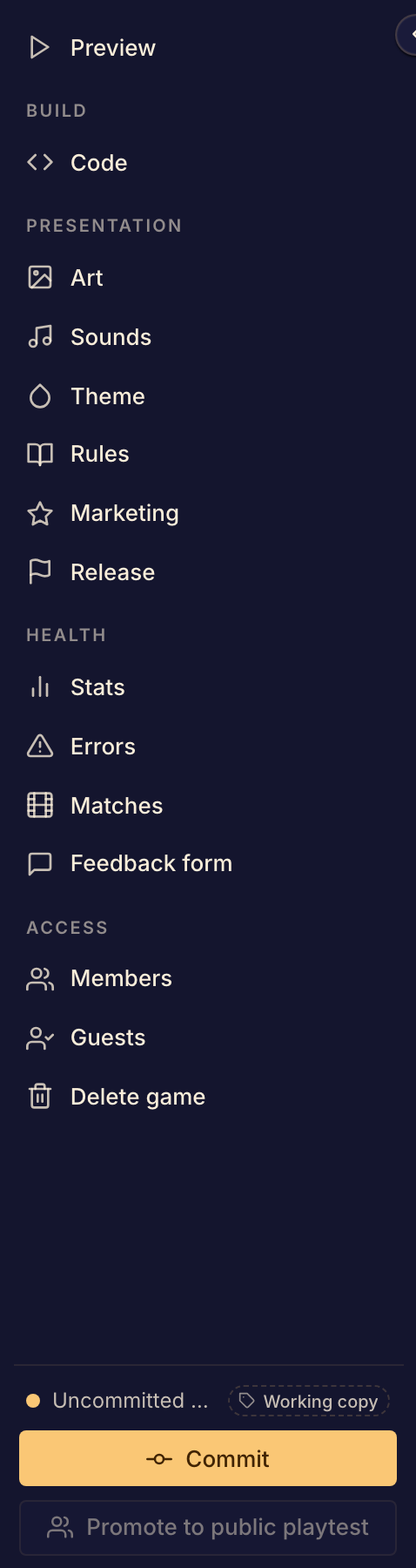
The foot of the sidebar
The foot of the sidebar shows which version is on screen. A dot and Uncommitted changes mean that you saved edits that are not in a version yet.
Admins and editors also see two buttons there:
- Commit makes a playable version from your working copy. See Commit a game version.
- Promote to public playtest lets anyone on Boardweaver play your latest commit. See Open a public playtest.
When you collapse the sidebar, each page shows as an icon. Point at an icon to see the page's name.
When a page is missing
A page can be missing for one of these reasons:
- Your role does not include it. Ask an admin of the game to change your role.
- The page is for Rust games only, such as Translations.
Some controls on a page also depend on a plan. See Plans and feature access.
Next, read Game versions and release channels to learn which version players get.