Read game statistics
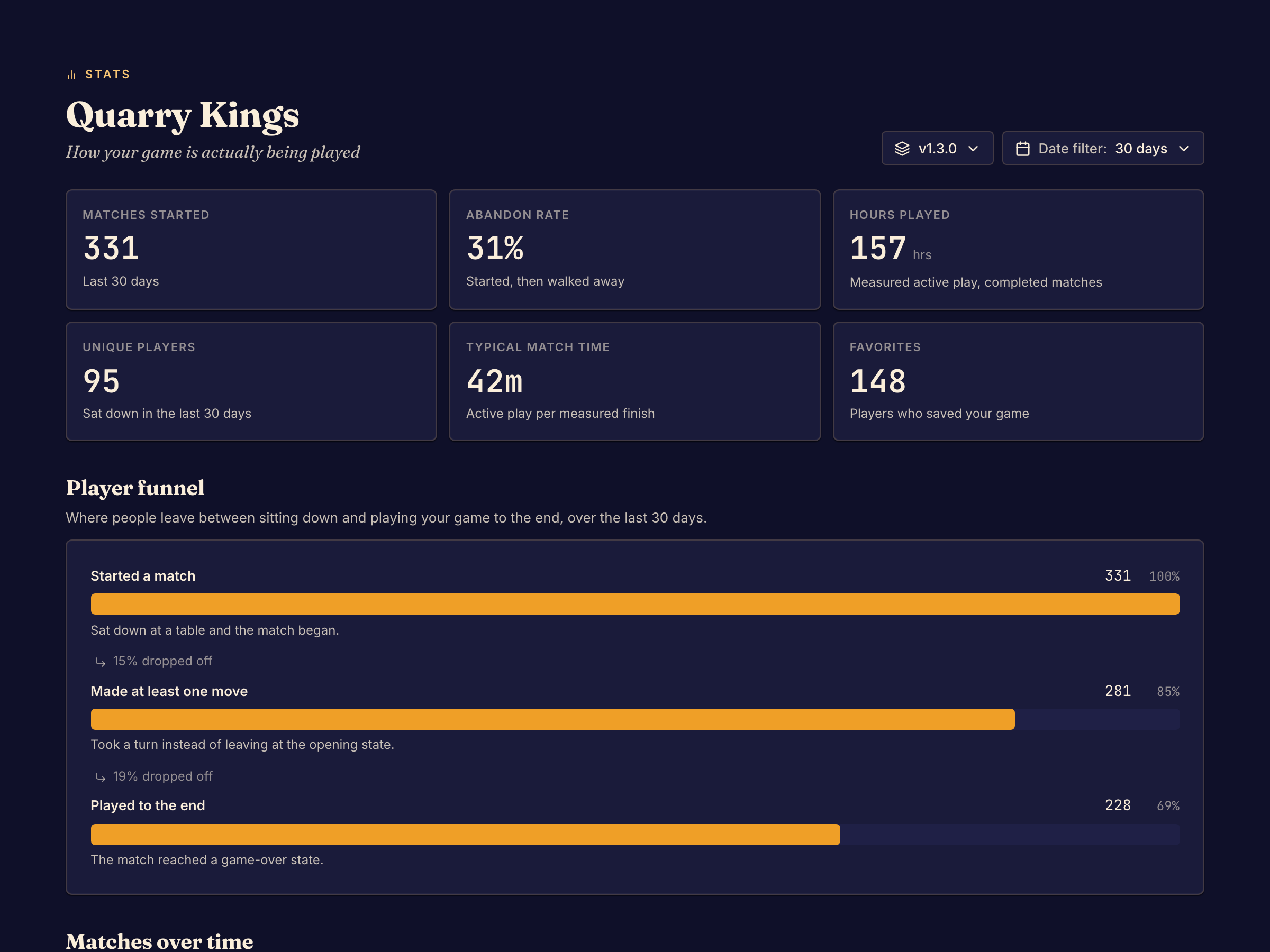
Stats shows how people play your game, counted from its matches. Everyone on the game can open it, under Health in the Studio sidebar.
| Measure | What it counts |
|---|---|
| Matches started | Matches that began in the date range. |
| Abandon rate | The share of started matches that a player walked away from. |
| Hours played | Measured active play in completed matches. |
| Unique players | People who sat down in the date range. |
| Typical match time | Active play per measured finished match. |
| Favorites | Players who saved your game. |
| Player funnel | How many matches reached each step: Started a match, Made at least one move and Played to the end. |
| Matches over time | Matches started per day, or per week when the range is 12 months. |
| Errors over time | Errors your game had during matches. |
| Points by category | Average points per finished match for each score label, for the winners and for everyone else. |
Choose what to count
Two menus at the top choose the matches that Stats counts:
- The version menu shows All versions at first. Choose one commit to see only its matches. Each commit shows the release channels it is in.
- Date filter chooses the last 7 days, 30 days, 90 days or 12 months. It starts at 30 days.
To compare two versions, choose each one in turn with the same date range.
Read the results
Player funnel shows where people stop. A large drop before Made at least one move means that players leave at the first position. A large drop before Played to the end means that they leave during the game.
Points by category counts only matches that finished with one winner and in which nobody walked out. A wide gap between winners and everyone else shows a category that decides games. Use Player count to see one player count, and View to switch between Chart and Table.
When a chart is empty
- No matches started in this selection. No match fits the version and the date range. Choose a wider range or All versions.
- No errors recorded in this selection. Your game had no errors in those matches.
- No clear winners yet. No finished match had one winner. The categories come from the score labels your game reports, so a game that reports no score labels has none to show.
To look at the matches behind a number, see Review matches and feedback.