Open a public playtest
A public playtest lets anyone on Boardweaver play one commit of your game while you keep working on it. Admins and editors can open and update it. Admins can end it from Release. When a public playtest match ends, Boardweaver asks the players for feedback.
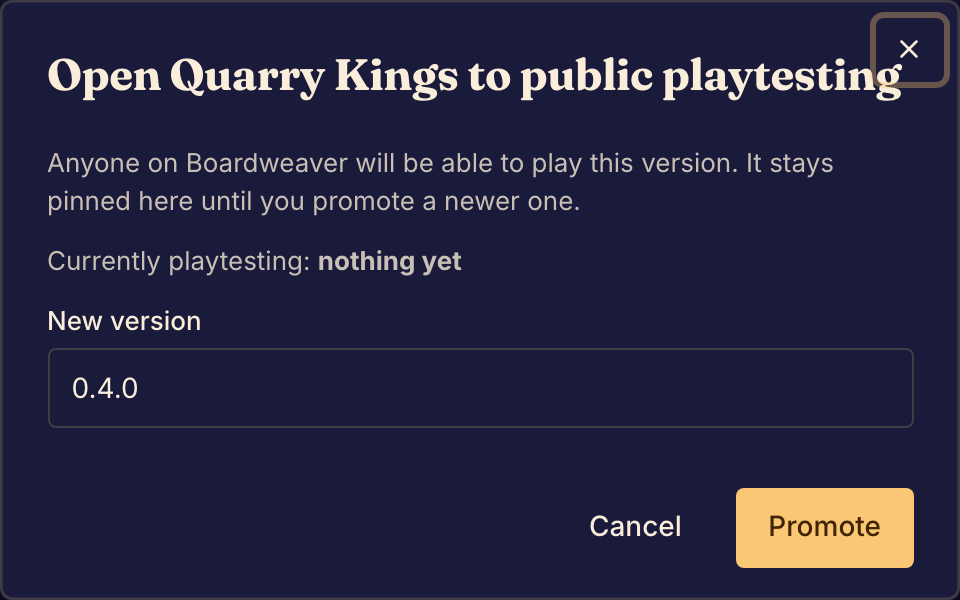
Open a public playtest
- Commit your changes. Boardweaver promotes your latest commit. See Commit a game version.
- Select Promote to public playtest at the foot of the Studio sidebar. Admins can also open Release and select Open playtest.
- In New version, enter the version label that players see, such as 1.0.0. Boardweaver fills in a suggestion.
- Select Promote. Studio shows Now in public playtesting.
If your game is not published, its card in the catalog shows a Public playtest badge.
Update the public playtest
- Commit your new changes.
- Select Promote to public playtest. In Release, the same action is Promote latest commit.
- Enter a new label in New version, then select Promote.
The next public playtest match that starts uses the new commit. Matches in progress keep the version they started with.
End the public playtest
- Open Release in the Studio sidebar.
- Select End playtest, then End playtesting. Studio shows Public playtesting ended.
After that, players who are not members of the game cannot start a match on it. Matches in progress continue.
When you cannot promote
When Promote to public playtest is not available, point at it to see why:
- Commit your changes first: you have changes that are not committed.
- Commit something first: the game has no commit yet.
- The latest commit is already in public playtesting: commit a change first.
Boardweaver refuses a version label that another commit already uses. Choose a different label and select Promote again.
A public playtest does not publish your game. See Publish a game and Game versions and release channels.
Next, review matches and feedback.